What is a bitcoin node? Full nodes explained simply
What a bitcoin node does, full vs pruned vs light nodes, how nodes differ from miners, what hardware you need to run one, and whether running a node is worth it.
CryptoGroup Newsroom · · 5 min read
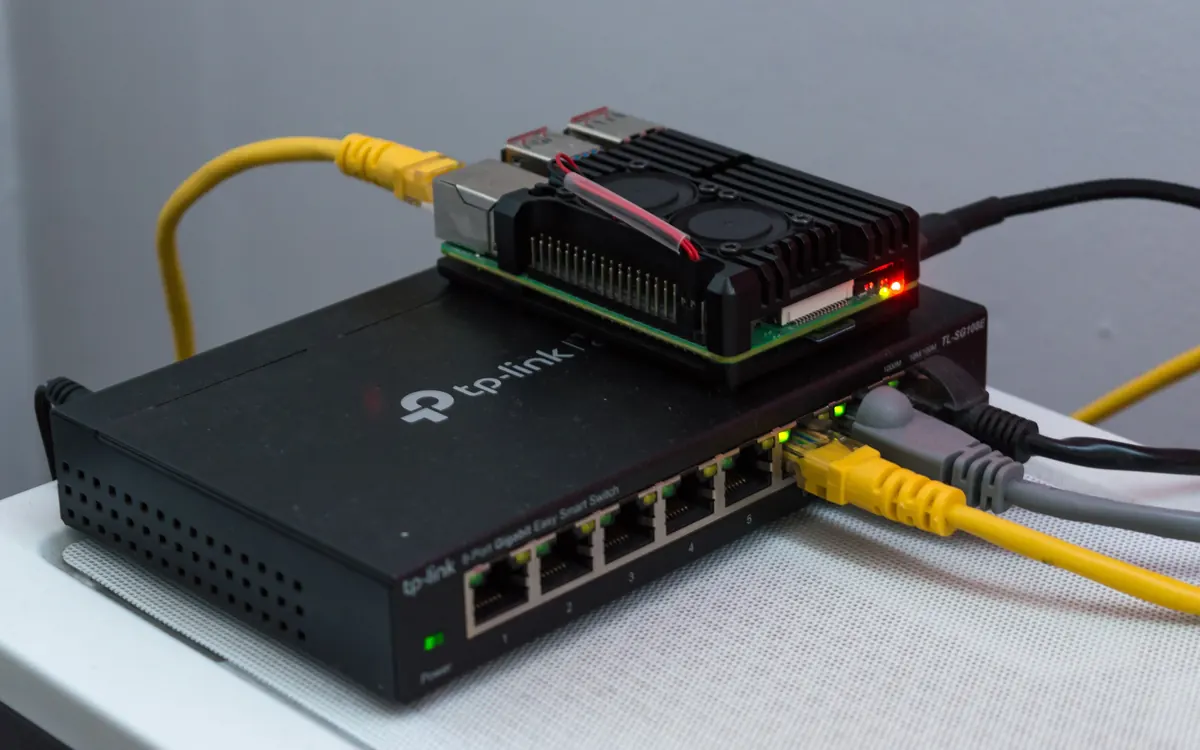
A bitcoin node is any computer running bitcoin software that connects to other computers on the network, downloads blocks and transactions, checks them against bitcoin's rules and passes valid ones on. There is no central server in bitcoin: the network is these nodes. This guide explains what nodes do, the different types, how they differ from miners and what it takes to run one. It is educational, not investment advice.
What a node actually does
Every full node does the same core jobs, independently:
- Downloads the blockchain from other nodes, starting with the first block from January 2009.
- Validates everything: that signatures are correct, that no coin is spent twice, that blocks follow size and difficulty rules and that no block creates more new bitcoin than allowed.
- Keeps the current list of unspent coins (the UTXO set), so it can check new transactions instantly.
- Relays valid transactions and blocks to its peers and drops invalid ones.
- Serves wallets: your own wallet can connect to your node to see balances and broadcast payments.
Because each node checks the rules for itself, nobody has to trust anybody else. If a miner produced a block paying itself extra coins, every full node would simply reject it. That is why people say nodes, not miners, enforce the 21 million supply limit. For the bigger picture of how this fits together, see what bitcoin is.
Types of nodes
| Stores | Validates | Typical use | |
|---|---|---|---|
| Full (archival) node | Entire blockchain | Everything | Serving the network, explorers, businesses |
| Pruned full node | Recent blocks only | Everything | Home users with limited disk space |
| Light (SPV) client | Block headers | Only parts | Mobile wallets |
| Mining node | Full blockchain | Everything | Building block templates for miners |
A pruned node still downloads and checks every block, then deletes old ones it no longer needs, so it gives you the same security with far less storage. A light client relies on full nodes for most information, which is convenient but means trusting them more. Lightning nodes are separate software that sits on top of a bitcoin node; our Lightning Network guide explains how they work.
Nodes vs miners
People often mix the two up. Miners spend electricity to compete for the right to add the next block and earn the block reward plus fees, usually by joining a mining pool. Nodes check whether that block is valid. A miner needs a node to know what to build on, but most nodes never mine. Running a node uses ordinary hardware and pays no reward.
Bitcoin Core and other software
Most nodes run Bitcoin Core, the reference implementation maintained by volunteer developers. Alternatives such as Bitcoin Knots and btcd exist, but all must follow the same consensus rules or they would split from the network. Like any software, node clients have bugs: in October 2026 Core disclosed three AI-found flaws, including one that could crash nodes on Windows and macOS, after changing its disclosure policy. Keeping your node updated is part of running one.
What you need to run a node
- Storage: the full blockchain is well over 600 GB and growing, so a 1 TB SSD is a common choice. A pruned node can run in a few GB.
- Computer: an old laptop or desktop, a small mini-PC or a Raspberry Pi 4 or 5 with an external SSD. Several gigabytes of RAM help the initial sync.
- Internet: an unmetered connection is best; the first download takes hours to days and the node then exchanges data continuously.
- Software: Bitcoin Core directly, or a plug-and-play node package such as Umbrel, Start9 or RaspiBlitz that installs it with a web interface.
The first sync, called initial block download, is the slow part, because your node re-checks every transaction since 2009. After that it stays current within seconds of each new block, roughly every ten minutes.
Why people run their own node
- Verify, don't trust: your wallet checks payments against your own copy of the rules instead of a company's server.
- Privacy: wallets that query public servers reveal your addresses; querying your own node does not.
- Censorship resistance: you can broadcast transactions yourself.
- Supporting the network: more independent nodes make bitcoin harder to capture or change without broad agreement.
Downsides
Running a node costs disk space, bandwidth and a little attention. Opening port 8333 so others can connect to you is optional. A node also does not protect your coins by itself: your keys still live in your wallet, so the basics in how to store crypto safely still apply.
Frequently asked questions
Do you get paid for running a bitcoin node?
No. Nodes earn no rewards; only miners receive block rewards and fees. People run nodes for verification, privacy and to support the network.
Can I run a bitcoin node on a Raspberry Pi?
Yes. A Raspberry Pi 4 or 5 with an external SSD of about 1 TB is a popular low-power setup, often with software like Umbrel or RaspiBlitz.
Do I need a node to use bitcoin?
No. Most wallets connect to other people's nodes. Running your own simply removes the need to trust them.
How many bitcoin nodes are there?
Nobody knows exactly, because many nodes do not accept incoming connections and cannot be counted. Public trackers only see the reachable ones.
This article is for information only and is not financial advice. Crypto assets are volatile; do your own research. Read our disclaimer
More from Bitcoin
View all →Market update
Bitcoin ETFs add $176M as ether funds keep bleeding
Read next

Fed holds rates at 3.75%–4%; bitcoin steady near $81,000
The Fed kept rates at 3.75%–4% in a 10–2 vote, with Cook and Hammack backing a hike. Bitcoin held near $81,000 as traders eyed a possible December increase.

Coinbase Q3 earnings: what to watch after Robinhood's crypto slump
Coinbase reports Q3 results on Thursday after Robinhood's crypto revenue fell 55%. Analyst forecasts for volume, revenue, stablecoin income and derivatives.

CFTC's Selig: who is liable if an AI trading agent goes rogue?
At a CFTC forum, chairman Mike Selig called AI a road to autonomous trading and asked whether agent developers must register and if 'know your agent' rules are needed.